Showing posts with label DataTable. Show all posts
Showing posts with label DataTable. Show all posts
Tuesday, August 7, 2012

Tuesday, June 19, 2012
DataTable RejectChanges
The DataTable’s RejectChanges() method rolls back the
changes done to the DataRow.
Now let us see with an example, on how the rowstate property
gets affected by calling the RejectChanges() method of the DataTable.
Let us add a new row to a DataTable, and perform
various operations on the row to observer the change in the RowState of the
row.
// Fill the DataTable with your own logic
// Here we will fill the table by calling the Domain class.
clsEmployee objEmp = new
clsEmployee();
DataTable dtEmployee = objEmp.GetEmployeeList();
DataRow drEmp;
DataRow drEmp;
//
// Add a new Row and perform data changes
drEmp =
dtEmployee.NewRow(); // RowState - Detached
dtEmployee.Rows.Add(drEmp); // RowState - Added
dtEmployee.RejectChanges(); // RowState -
Detached
drEmp["ID"] = 3134; // RowState
- Detached
drEmp.Delete(); //
RowState - Detached
drEmp =
dtEmployee.NewRow(); // RowState - Detached
dtEmployee.Rows.Add(drEmp); // RowState - Added
dtEmployee.AcceptChanges(); // RowState -
Unchanged
drEmp["ID"] = 3134; // RowState
- Modified
dtEmployee.RejectChanges(); // RowState -
Unchanged
drEmp =
dtEmployee.NewRow(); // RowState - Detached
dtEmployee.Rows.Add(drEmp); // RowState - Added
dtEmployee.AcceptChanges(); // RowState -
Unchanged
drEmp["ID"] = 3134; // RowState
- Modified
dtEmployee.AcceptChanges(); // RowState -
Unchanged
drEmp.Delete(); //
RowState - Deleted
dtEmployee.RejectChanges(); // RowState - Unchanged
Calling RejectChanges, after Adding a new row removes the row from the DataTable
Calling RejectChanges, after Modifying a row rolls back the state of the row to Unchanged
Calling RejectChanges, after Deleting a row rolls back the state of the row to Unchanged
Notice that, every time you call the DataTable’s RejectChanges()
method, the changes are rolled back either to the initial state or to the state
when AcceptChanges() was last called on the DataTable.
The following are the changes of RowState of the DataRows in the DataTable, before and after calling the DataTable’s AcceptChanges() method.
The following are the changes of RowState of the DataRows in the DataTable, before and after calling the DataTable’s AcceptChanges() method.
RowState before calling
RejectChanges()
|
RowState after calling
RejectChanges()
|
Impact on the Row
|
Added
|
Detached
|
Row is Permanently Removed from the
DataTable
|
Modified
|
Unchanged
|
Data modifications to the row are rolled
back.
|
Deleted
|
Unchanged
|
Row is retained in the DataTable
|
The RejectChange() method can also be called on the individual
DataRows in the DataTable, calling the DataTable’s RejectChanges() method, will
rollback the changes of all the DataRows in the DataTable.
To know more on the DataTable’s AcceptChanges() method,
refer the post DataTable AcceptChanges.
Related Posts
DataRow RowState
DataTable AcceptChanges
DataTable RejectChanges
Get new rows in a DataTable / DataGridView in C# Windows Forms
Get Modified rows in a DataTable / DataGridView in C# Windows Forms
Get Deleted rows in a DataTable / DataGridView in C# Windows Forms
Related Posts
DataRow RowState
DataTable AcceptChanges
DataTable RejectChanges
Get new rows in a DataTable / DataGridView in C# Windows Forms
Get Modified rows in a DataTable / DataGridView in C# Windows Forms
Get Deleted rows in a DataTable / DataGridView in C# Windows Forms
DataTable AcceptChanges
The DataTable’s AcceptChanges() method commits the
changed done to the DataRow and the DataTable’s RejectChanges() method rolls
back the changes done to the DataRow.
Now let us see with an example, on how the rowstate property
gets affected by calling the AcceptChanges() method of the DataTable.
Let us add a new
row to a DataTable, and perform various operations on the row to observer the
change in the RowState of the row.
// Fill the DataTable with your own logic
// Here we will fill the table by calling the Domain class.
clsEmployee objEmp = new
clsEmployee();
DataTable dtEmployee = objEmp.GetEmployeeList();
DataRow drEmp;
DataRow drEmp;
//
// Add a new Row and perform data changes
drEmp =
dtEmployee.NewRow(); // RowState - Detached
dtEmployee.Rows.Add(drEmp); // RowState - Added
dtEmployee.AcceptChanges(); // RowState - Unchanged
drEmp["ID"] = 3134; // RowState -
Modified
dtEmployee.AcceptChanges(); // RowState - Unchanged
drEmp.Delete(); // RowState -
Deleted
dtEmployee.AcceptChanges(); // RowState - Detached
gvEmployees.DataSource =
dtEmployee;
Notice that, every time you call the DataTable’s AcceptChanges()
method, the changes are committed to the DataTable and the RowState is reset to
Unchanged.
The following are the changes of RowState of the DataRows in the DataTable, before and after calling the DataTable’s AcceptChanges() method.
The following are the changes of RowState of the DataRows in the DataTable, before and after calling the DataTable’s AcceptChanges() method.
RowState before calling AcceptChanges()
|
RowState after calling AcceptChanges()
|
Impact on the Row
|
Added
|
Unchanged
|
New row is commited to the DataTable
|
Modified
|
Unchanged
|
Data Changes to the row are committed to
the DataTable
|
Deleted
|
Detached
|
Row is Permanently Removed from the
DataTable
|
The AcceptChange() method can also be called on the individual
DataRows in the DataTable, calling the DataTable’s AcceptChanges() method, will
commit the changes of all the DataRows in the DataTable.
To know more on the DataTable’s RejectChanges() method,
refer the post DataTable RejectChanges.
Related Posts
DataRow RowState
DataTable AcceptChanges
DataTable RejectChanges
Get new rows in a DataTable / DataGridView in C# Windows Forms
Get Modified rows in a DataTable / DataGridView in C# Windows Forms
Get Deleted rows in a DataTable / DataGridView in C# Windows Forms
Related Posts
DataRow RowState
DataTable AcceptChanges
DataTable RejectChanges
Get new rows in a DataTable / DataGridView in C# Windows Forms
Get Modified rows in a DataTable / DataGridView in C# Windows Forms
Get Deleted rows in a DataTable / DataGridView in C# Windows Forms
DataRow RowState
The RowState is a very useful property of a DataRow, it
gives the current state of the row. The state of the row is affected based on
the operations performed on the row, like Add, Modify Delete. The RowState of a row can take one of the
following values.
- Detached
- Added
- Unchanged
- Modified
- Deleted
Let us add a new
row to a DataTable, and perform various operations on the row to observer the
change in the RowState of the row.
// Fill the DataTable with your own logic
// Here we will fill the table by calling the Domain class.
clsEmployee objEmp = new
clsEmployee();
DataTable dtEmployee = objEmp.GetEmployeeList();
DataRow drEmp;
DataRow drEmp;
//
// Add a new Row and perform data changes
drEmp =
dtEmployee.NewRow(); // RowState -
Detached
dtEmployee.Rows.Add(drEmp); // RowState
- Added
drEmp["ID"] = 3134; //
RowState - Added
drEmp.Delete(); //
RowState - Detached
//
drEmp =
dtEmployee.NewRow(); // RowState - Detached
dtEmployee.Rows.Add(drEmp); // RowState
- Added
dtEmployee.AcceptChanges(); // RowState
- Unchanged
drEmp["ID"] = 3134; //
RowState - Modified
drEmp.Delete(); //
RowState – Deleted
Notice that in the first block, the RowState is not
changed, this is because we did not call the DataTable’s AcceptChanges() method,
thought we performed an edit operation in the row, the RowState still remained Added.
The DataTable’s AcceptChanges()
method commits the changes to the DataTable. In the 2nd code block,
we called the DataTable’s AcceptChanges() method after adding the row to the
table, hence the RowState gets changed after performing a Modify/Delete
operation.
The DataTable’s AcceptChanges() method commits the
changed done to the DataRow and the DataTable’s RejectChanges() method rolls
back the changes done to the DataRow. To know more about these methods refer
the posts
.
Related Posts
Get Deleted rows in a DataTable / DataGridView in C# Windows Forms
.
Related Posts
Get Deleted rows in a DataTable / DataGridView in C# Windows Forms
Thursday, May 31, 2012
DataTable.Select() Vs DataTable.Rows.Find() Performance Test - Filter on Primary Key
In this post DataTable.Select() Vs DataTable.Rows.Find()
Performance Test - Filter on Primary Key we, shall compare the performance
of DataTable.Select() and DataTable.Rows.Find(), in performing a filter
based on the Primary Key of the table.
Asp.Net provides a number
of ways to filter data, like DataTable.Select, DataTable.Rows.Find, DataView.RowFilter etc, each one
has its own advantages and disadvantages, we shall now see the difference in
the execution time between DataTable.Select() and DataTableRows.Filter()
The configuration of the system used to
perform the evaluation is as follows.
OS
|
Windows XP Professional 2002 SP3
|
Processor
|
Pentium® D 2.66 GHz
|
RAM
|
3 GB
|

The performance test was carried out for 50
iterations with both DataTable.Select() and DataTable.Rows.Find(); the
results of the test are as follows.
DataTable.Select() Average time: 31.86 Microseconds
DataTable.Rows.Find() Average time: 4.24 Microseconds
DataTable.Rows.Find() Average time: 4.24 Microseconds

Inference
DataTable.Rows.Find() performs far better than DataTable.Select(), when it comes to filtering data based on Primary Key column.
The code used to perform the test is as
follows
protected void
Page_Load(object sender, EventArgs ea)
{
string
strConn = ConfigurationManager.ConnectionStrings["EmployeesConnectionString"].ToString();
objConn = new
SqlConnection(strConn);
strQuery = "SELECT
* FROM Employee";
objCmd = new
SqlCommand(strQuery, objConn);
objDA = new
SqlDataAdapter(objCmd);
dsEmployee = new
DataSet();
objDA.Fill(dsEmployee, "dtEmployee");
//
DataColumn[]
arrPrimaryKey = new DataColumn[1];
arrPrimaryKey[0] = dsEmployee.Tables["dtEmployee"].Columns["ID"];
dsEmployee.Tables["dtEmployee"].PrimaryKey
= arrPrimaryKey;
//
Response.Write("Test
Block 1
");
");
for (int i = 0; i < 50; i++)
{
TestBlock1();
}
//
Response.Write("
Test Block 2
");
Test Block 2
");
for (int i = 0; i < 50; i++)
{
TestBlock2();
}
}
//
private void
TestBlock1()
{
timer = new
Stopwatch();
timer.Start();
//
DataRow[]
drEmp = dsEmployee.Tables["dtEmployee"].Select("ID=2515");
//
timer.Stop();
//
Response.Write((1e6 * timer.ElapsedTicks /
(double)Stopwatch.Frequency).ToString()
+ "
");
");
}
//
private void
TestBlock2()
{
timer = new
Stopwatch();
timer.Start();
//
DataRow
drEmp = dsEmployee.Tables["dtEmployee"].Rows.Find(2515);
//
timer.Stop();
//
Response.Write((1e6 * timer.ElapsedTicks /
(double)Stopwatch.Frequency).ToString()
+ "
");
");
}
Related Posts
DataTable.Select() Vs DataView.RowFilter() Performance Test – Filtering Rows
In this post DataTable.Select() Vs DataView.RowFilter()
Performance Test – Filtering Rows we, shall compare the performance of DataTable.Select()
and DataView.RowFilter() in populating a GridView.
Asp.Net provides a number
of ways to fill a GridView, like DataReader, DataTable, DataView etc, each one has its own advantages
and disadvantages, we shall now see the difference in the execution time
between DataTable.Select() and DataView.RowFilter()
The configuration of the system used to
perform the evaluation is as follows.
OS
|
Windows XP Professional 2002 SP3
|
Processor
|
Pentium® D 2.66 GHz
|
RAM
|
3 GB
|
The performance test was carried out for 50iterations with both DataTable and DataView; the results of the test are
as follows.
Total Records in Table: 3000
Matching Records: 643
DataTable.Select() Average time: 50.26 Milliseconds
DataView.RowFilter() Average time: 43.88 Milliseconds
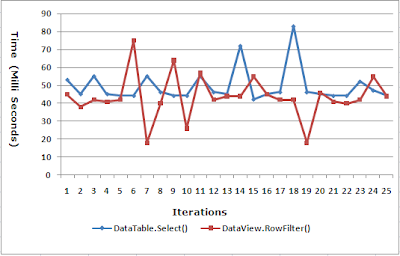
DataView.RowFilter() Average time: 43.88 Milliseconds

Inference
DataView.RowFilter() performs better than DataTable.Select() when the DataView is sorted based on the column to be filtered, this is because when the DataView is sorted, an index is created based on the sorted column, hence it is advisable to SORT a dataview and use the same for filtering especially when we want to perform multiple filters based on the same column.
DataView.RowFilter() performs better than DataTable.Select() when the DataView is sorted based on the column to be filtered, this is because when the DataView is sorted, an index is created based on the sorted column, hence it is advisable to SORT a dataview and use the same for filtering especially when we want to perform multiple filters based on the same column.
The code used to perform the test is as
follows.
protected void
Page_Load(object sender, EventArgs ea)
{
string
strConn = ConfigurationManager.ConnectionStrings["EmployeesConnectionString"].ToString();
objConn = new
SqlConnection(strConn);
strQuery = "SELECT
* FROM Employee";
objCmd = new
SqlCommand(strQuery, objConn);
objDA = new
SqlDataAdapter(objCmd);
dsEmployee = new
DataSet();
objDA.Fill(dsEmployee, "dtEmployee");
//
DataColumn[]
arrPrimaryKey = new DataColumn[1];
arrPrimaryKey[0] = dsEmployee.Tables["dtEmployee"].Columns["ID"];
dsEmployee.Tables["dtEmployee"].PrimaryKey
= arrPrimaryKey;
//
dvEmployee = new
DataView(dsEmployee.Tables["dtEmployee"]);
dvEmployee.Sort = "Name";
//
Response.Write("Test
Block 1
");
");
for (int i = 0; i < 50; i++)
{
TestBlock1();
}
//
Response.Write("
Test Block 2
");
Test Block 2
");
for (int i = 0; i < 50; i++)
{
TestBlock2();
}
}
//
private void
TestBlock1()
{
timer = new
Stopwatch();
timer.Start();
//
dvEmployee.RowFilter = "Name='John'";
grdEmployees.DataSource = dvEmployee;
grdEmployees.DataBind();
//
timer.Stop();
//
Response.Write(timer.ElapsedMilliseconds.ToString() + "
");
");
}
//
private void
TestBlock2()
{
timer = new
Stopwatch();
timer.Start();
//
DataRow[]
drEmp = dsEmployee.Tables["dtEmployee"].Select("Name='John'");
//
grdEmployees.DataSource =
drEmp.CopyToDataTable();
grdEmployees.DataBind();
timer.Stop();
//
Response.Write(timer.ElapsedMilliseconds.ToString()
+ "
");
");
}
That’s it we have seen the performance difference between
the DataTable.Select() and the DataView.RowFilter() in loading a GridView.
Related Posts
Subscribe to:
Posts (Atom)