In this post DataTable.Select() Vs DataView.RowFilter()
Performance Test – Filtering Rows we, shall compare the performance of DataTable.Select()
and DataView.RowFilter() in populating a GridView.
Asp.Net provides a number
of ways to fill a GridView, like DataReader, DataTable, DataView etc, each one has its own advantages
and disadvantages, we shall now see the difference in the execution time
between DataTable.Select() and DataView.RowFilter()
The configuration of the system used to
perform the evaluation is as follows.
OS
|
Windows XP Professional 2002 SP3
|
Processor
|
Pentium® D 2.66 GHz
|
RAM
|
3 GB
|

The performance test was carried out for 50iterations with both DataTable and DataView; the results of the test are
as follows.
Total Records in Table: 3000
Matching Records: 643
DataTable.Select() Average time: 50.26 Milliseconds
DataView.RowFilter() Average time: 43.88 Milliseconds
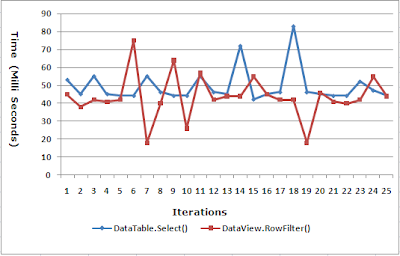
DataView.RowFilter() Average time: 43.88 Milliseconds

Inference
DataView.RowFilter() performs better than DataTable.Select() when the DataView is sorted based on the column to be filtered, this is because when the DataView is sorted, an index is created based on the sorted column, hence it is advisable to SORT a dataview and use the same for filtering especially when we want to perform multiple filters based on the same column.
DataView.RowFilter() performs better than DataTable.Select() when the DataView is sorted based on the column to be filtered, this is because when the DataView is sorted, an index is created based on the sorted column, hence it is advisable to SORT a dataview and use the same for filtering especially when we want to perform multiple filters based on the same column.
The code used to perform the test is as
follows.
protected void
Page_Load(object sender, EventArgs ea)
{
string
strConn = ConfigurationManager.ConnectionStrings["EmployeesConnectionString"].ToString();
objConn = new
SqlConnection(strConn);
strQuery = "SELECT
* FROM Employee";
objCmd = new
SqlCommand(strQuery, objConn);
objDA = new
SqlDataAdapter(objCmd);
dsEmployee = new
DataSet();
objDA.Fill(dsEmployee, "dtEmployee");
//
DataColumn[]
arrPrimaryKey = new DataColumn[1];
arrPrimaryKey[0] = dsEmployee.Tables["dtEmployee"].Columns["ID"];
dsEmployee.Tables["dtEmployee"].PrimaryKey
= arrPrimaryKey;
//
dvEmployee = new
DataView(dsEmployee.Tables["dtEmployee"]);
dvEmployee.Sort = "Name";
//
Response.Write("Test
Block 1
");
");
for (int i = 0; i < 50; i++)
{
TestBlock1();
}
//
Response.Write("
Test Block 2
");
Test Block 2
");
for (int i = 0; i < 50; i++)
{
TestBlock2();
}
}
//
private void
TestBlock1()
{
timer = new
Stopwatch();
timer.Start();
//
dvEmployee.RowFilter = "Name='John'";
grdEmployees.DataSource = dvEmployee;
grdEmployees.DataBind();
//
timer.Stop();
//
Response.Write(timer.ElapsedMilliseconds.ToString() + "
");
");
}
//
private void
TestBlock2()
{
timer = new
Stopwatch();
timer.Start();
//
DataRow[]
drEmp = dsEmployee.Tables["dtEmployee"].Select("Name='John'");
//
grdEmployees.DataSource =
drEmp.CopyToDataTable();
grdEmployees.DataBind();
timer.Stop();
//
Response.Write(timer.ElapsedMilliseconds.ToString()
+ "
");
");
}
That’s it we have seen the performance difference between
the DataTable.Select() and the DataView.RowFilter() in loading a GridView.
Related Posts