Showing posts with label InfoPath. Show all posts

Friday, September 14, 2012

InfoPath Forms Services - Enable Browser Compatible InfoPath forms

InfoPath forms created using Office InfoPath can be published as templates in the forms library. SharePoint 2007 InfoPath Forms Services supports opening InfoPath forms in Browser, but for this we need to make sure that the following settings are in place.

1. In the Central Administrator, make sure that the Browser enable features are checked.
Central Administration -> Application Management ->
InfoPath Forms Services -> Configure InfoPath Forms Services


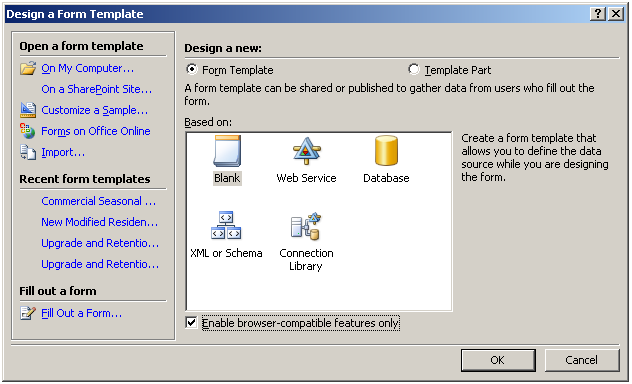
2. While creating the InfoPath form, make sure that the “Enable browser compatible features only” checkbox is checked. This will make sure that only features which can be displayed in the browser are used while creating the form.
Related Posts
What is Office InfoPath?
What is InfoPath Forms Services?
InfoPath Forms Services - Enable Browser Compatible InfoPath forms


What is InfoPath Forms Services?

InfoPath Forms Services is a new Feature available from SharePoint 2007, Forms Services enables us to create Form Libraries in SharePoint which can host InfoPath forms, developed using Office InfoPath.

InfoPath forms created using Office InfoPath can be published as templates in the forms library, InfoPath forms also support browser compatible version, which allows the users to open the published forms in browser, without the need to have Office InfoPath installed in all the end user computers.


InfoPath Form Services settings can be configured using the InfoPath Forms Services section in the Central Administrator.

Central Administrator -> Application Management -> InfoPath Forms Services


Related Posts
What is Office InfoPath?
What is InfoPath Forms Services?
InfoPath Forms Services - Enable Browser Compatible InfoPath forms


What is Office InfoPath?

Collecting information from various stakeholders in a key activity in any business, InfoPath Forms helps in creating a streamlined and structured process for collecting information from various types of users and applications.

InfoPath forms can be published in Browser, Outlook, SharePoint Lists, etc, so it provides users various convenient ways to enter information, InfoPath forms are light weight forms which can be designed and published quickly, when compared to creating forms in applications like Asp.net or JSP.

InfoPath forms can be opened in 2 modes.


Design Mode
– In this mode we can create the forms, add controls, dependencies, data connections etc, programmers / designers use this more to create / modify InfoPath forms.

Fill out Mode – In this mode the form is ready to accept data from the users, end users open the form in this mode to enter data and save/submit them.
The same InfoPath form can be published in more than one form (SharePoint List, Web Page, E-mail) based on the needs of the end-users, yet we can collect the data entered in all forms in a centralized datasource for consolidation.

Related Posts
What is Office InfoPath?
What is InfoPath Forms Services?
InfoPath Forms Services - Enable Browser Compatible InfoPath forms