Showing posts with label SharePoint Business Process Management. Show all posts

Friday, September 14, 2012

InfoPath Forms Services - Enable Browser Compatible InfoPath forms

InfoPath forms created using Office InfoPath can be published as templates in the forms library. SharePoint 2007 InfoPath Forms Services supports opening InfoPath forms in Browser, but for this we need to make sure that the following settings are in place.

1. In the Central Administrator, make sure that the Browser enable features are checked.
Central Administration -> Application Management ->
InfoPath Forms Services -> Configure InfoPath Forms Services


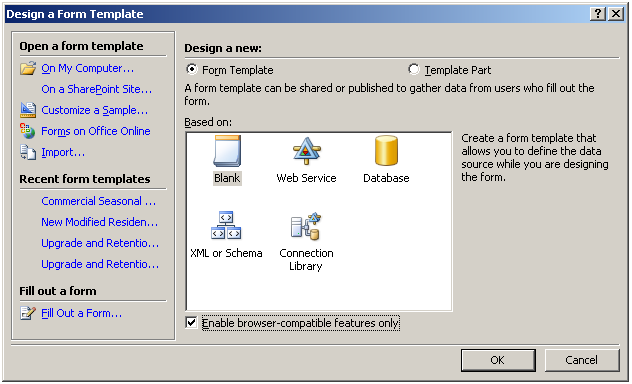
2. While creating the InfoPath form, make sure that the “Enable browser compatible features only” checkbox is checked. This will make sure that only features which can be displayed in the browser are used while creating the form.
Related Posts
What is Office InfoPath?
What is InfoPath Forms Services?
InfoPath Forms Services - Enable Browser Compatible InfoPath forms


What is InfoPath Forms Services?

InfoPath Forms Services is a new Feature available from SharePoint 2007, Forms Services enables us to create Form Libraries in SharePoint which can host InfoPath forms, developed using Office InfoPath.

InfoPath forms created using Office InfoPath can be published as templates in the forms library, InfoPath forms also support browser compatible version, which allows the users to open the published forms in browser, without the need to have Office InfoPath installed in all the end user computers.


InfoPath Form Services settings can be configured using the InfoPath Forms Services section in the Central Administrator.

Central Administrator -> Application Management -> InfoPath Forms Services


Related Posts
What is Office InfoPath?
What is InfoPath Forms Services?
InfoPath Forms Services - Enable Browser Compatible InfoPath forms


What is Office InfoPath?

Collecting information from various stakeholders in a key activity in any business, InfoPath Forms helps in creating a streamlined and structured process for collecting information from various types of users and applications.

InfoPath forms can be published in Browser, Outlook, SharePoint Lists, etc, so it provides users various convenient ways to enter information, InfoPath forms are light weight forms which can be designed and published quickly, when compared to creating forms in applications like Asp.net or JSP.

InfoPath forms can be opened in 2 modes.


Design Mode
– In this mode we can create the forms, add controls, dependencies, data connections etc, programmers / designers use this more to create / modify InfoPath forms.

Fill out Mode – In this mode the form is ready to accept data from the users, end users open the form in this mode to enter data and save/submit them.
The same InfoPath form can be published in more than one form (SharePoint List, Web Page, E-mail) based on the needs of the end-users, yet we can collect the data entered in all forms in a centralized datasource for consolidation.

Related Posts
What is Office InfoPath?
What is InfoPath Forms Services?
InfoPath Forms Services - Enable Browser Compatible InfoPath forms

Thursday, August 23, 2012

SharePoint 2013 Composites


The following are the new Composite (Business Process Model) features in SharePoint 2013.

Feature
Description

SharePoint 2013 Workflow

The SharePoint 2010 Workflow is retained in SharePoint 2013, in addition the SharePoint 2013 Workflow module can be plugged in as an Add-On.

Built using Windows Workflow Foundation 4, OAuth and iFrame model.

Workflow activities are invoked using loosely coupled web services that use messaging APIs based on WCF to communicate with SharePoint

Workflow - no-code web service calls

Ability to call web services without adding any code.

Workflow - Visual workflow

visual workflow can be created by adding the Visio 2013 Preview add-in.

Workflow - Building blocks

New workflow building blocks added: Stage, Loop, and App Step.

Workflow - REST Support

Provides REST-based service endpoint for publishing, managing, and running workflows


Related Post
SharePoint 2013 Hardware and Software Requirements
SharePoint 2013 Authentication
SharePoint 2013 Sites
SharePoint 2013 Communities
SharePoint 2013 Content
SharePoint 2013 Search
SharePoint 2013 Insight
SharePoint 2013 Composites
SharePoint 2013 Claim Based Authentication
SharePoint 2013 Support for OAuth 2.0
SharePoint 2013 Distributed Cache Service


Monday, August 13, 2012

SharePoint Business Process Management


Business Process Management is the life line of any organization; BPM specifies the process and sequence of steps to be followed in executing each request which is handled by the organization. 

A basic flow looks as follows.

Start – Process – Review – Approval - Signoff


Every organization will have its own BPM flow for each activity it does, SharePoint helps in automating this process flow, limits manual paper based activities, reduces delay/wait time and improves process efficiency.

The following features enable SharePoint’s Business Process Management.

Feature
Description
InfoPath Forms
XML Based forms to capture details from End Users
Browser Compatible Forms
InfoPath forms can be designed in such a way that they can be opened in a Web Browser; this makes it easy for the end users to instantly open and update data in the forms.
Forms Services
Ability to Publish InfoPath forms in SharePoint Lists
SharePoint Designer Workflows
Easily configurable workflows with basic features
Visual Studio Workflows
Advanced workflows which require manual coding
Business Data Catalog
Integrate Data from Legacy applications like SAP, Siebel, databases etc.
Allows direct display of data from other sources using Web Services.
Workflow Alerts
Workflows can be integrated with e-Mails, can be configured to trigger an e-mail to users when a workflow task is assigned to them for approval.
Role Based Security
Defining roles at every stage of the Workflow, determines who can approve which record/document etc.