Showing posts with label LINQ. Show all posts
Showing posts with label LINQ. Show all posts
Sunday, August 25, 2019

Tuesday, August 7, 2012
Friday, June 15, 2012
LINQ to SQL - Select Top N Rows
Before writing a LINQ to SQL query, we
first need to create a DataContext using the LINQ to SQL Classes template, to know more on how to create the DataContext refer to
the post LINQ to SQL Sample
Once the DataContext is created we can
query the Object model using LINQ queries, let us consider the Employee table
which has the following structure.

The below code will fetch all the rows from
the Employee Table
EmployeeClassesDataContext dbContext = newEmployeeClassesDataContext();
var emp = from employees in dbContext.Employees
select employees;
grdEmployees.DataSource =
emp;
grdEmployees.DataBind();
Now we will select only the Top 10 rows
returned using the following LINQ query
EmployeeClassesDataContext dbContext = newEmployeeClassesDataContext();
var emp = (from
e in dbContext.Employees
select new { e.ID,
e.Name, e.Phone }).Take(10);
grdEmployees.DataSource =
emp;
grdEmployees.DataBind();
That’s it, Adding Take(n),
filters the results and returns only the top n rows from the query.
Friday, June 8, 2012
Anonymous Types in LINQ
In
this post Anonymous Types in LINQ, we shall see how Anonymous Types
are used to capture output of LINQ expressions.
To
know more about Anonymous Types refer the Post Anonymous Types in .Net 3.5
One
of the main uses of Anonymous Types is
to capture the output of LINQ expressions, the type and structure returned by a
LINQ expressions will vary based on the Expression, it will be difficult to pre-define
Types to hold the results returned by LINQ expressions,
Anonymous Types comes in handy in this situation, it accepts any type of result returned by the LINQ expressions without having to pre-define them.
Anonymous Types comes in handy in this situation, it accepts any type of result returned by the LINQ expressions without having to pre-define them.
In
the below example we use LINQ to SQL to get the details of Employees, the
results of the LINQ expression is captured in an Anonymous Type variable
emp.
To
know more about LINQ refer the Post What is LINQ?
To know more about LINQ to SQL refer the Post LINQ to SQL
To know more about LINQ to SQL refer the Post LINQ to SQL
Example:
EmployeeClassesDataContext dbContext = newEmployeeClassesDataContext();
var emp = (from e in dbContext.Employees
select new { e.ID, e.Name, e.Phone });
grdEmployees.DataSource =
emp;
grdEmployees.DataBind();
Notice that we are binding the Anonymous Type emp
directly to the GridView grdEmployees, before executing the LINQ Query
the type of emp is unknown, once the Query is executed, the Type emp stores the
details of the Employees returned by the LINQ query and the same is bound to
the GridView.
That’s it we have seen the usage of Anonymous Types in
capturing results returned by LINQ Expressions
Related Posts
Monday, June 4, 2012
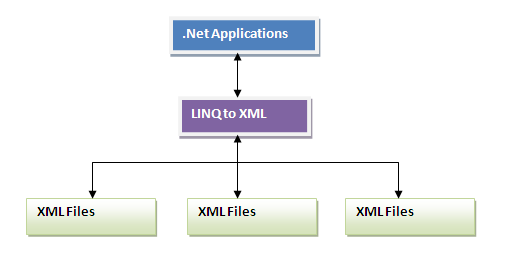
LINQ to XML Overview
LINQ to XML
is Microsoft’s new approach to process XML data using .Net, earlier in the days
of .Net 2.0 we had a number of classes to deal with XMLs like
XMLDocument
XMLReader
XMLTextReader
XMLWriter
XMLTextWriter
XPathNavigator
XmlNodeReader etc ….
XMLReader
XMLTextReader
XMLWriter
XMLTextWriter
XPathNavigator
XmlNodeReader etc ….
Knowing the purpose of each of these classes and using
them at the right time was a tedious process, moreover we had to write many
lines of code to process the XML documents; LINQ to XML comes as a
solution to this problem.
LINQ to XML
provides a set of new classes which can be used to process XML’s more
effectively with limited code.
LINQ to XML loads the XML document into memory from the file system, allows us to modify the xml’s and also allows us to save the updated document back into the file system, the concept is similar to DOM, but it more effective and productive with the new features.
LINQ to XML loads the XML document into memory from the file system, allows us to modify the xml’s and also allows us to save the updated document back into the file system, the concept is similar to DOM, but it more effective and productive with the new features.
Since LINQ to XML supports LINQ queries,
we can parse the XML’s using simple LINQ queries, earlier we had to iterate through
the nodes or use an XPath filter to parse the XML document, now with LINQ
this process has become a lot more easier.
Related Post
Friday, May 18, 2012
LINQ to SQL – Using ExecuteCommand() to Execute SQL Statements
LINQ to SQL – Using ExecuteCommand() to
Execute SQL Statements
Before writing a LINQ to SQL query, we first
need to create a DataContext using the LINQ to SQL Classes
template, to know more on how to create the DataContext refer to the post LINQ to SQL Sample
Once the DataContext is created we can query
the Object model using LINQ queries, let us consider the Employee table which
has the following structure.

ExecuteCommand, can
be used when we need to execute commands directly in the database. This method
can be used to execute plain SQL statements directly on the database, we can execute
the conventional SQL statements using this method. The syntax to use this
method is as follows.
public int ExecuteCommand
(
string sqlCommand,
params Object[] Parameters
)
Assume we have the following data in the Employee and
Department Tables
Table: Employee
ID
|
NAME
|
DOB
|
DOJ
|
DepartmentID
|
Salery
|
1
|
Tom
|
11/11/1967
|
05/01/2009
|
1
|
5000
|
2
|
Harry
|
10/07/1973
|
05/01/2009
|
2
|
6000
|
3
|
Peter
|
01/01/1982
|
01/01/2002
|
3
|
6500
|
4
|
John
|
05/04/1981
|
05/01/2009
|
3
|
7500
|
5
|
Charles
|
12/12/1973
|
05/01/2009
|
NULL
|
6500
|
Table: Department
ID
|
NAME
|
1
|
Finance
|
2
|
Human Resources
|
3
|
IT
|
4
|
Sales
|
5
|
Marketing
|
The SQL query to delete data from the
Employees table will be as follows.
DELETE Employee WHERE ID = 5
DELETE Employee WHERE ID = 5
Now let us see, on how to execute this SQL statement using the ExecuteCommand() method .
EmployeeClassesDataContext dbContext = new EmployeeClassesDataContext();
//
dbContext.ExecuteCommand("DELETE
Employee WHERE ID = {0}", 5);
That’s
it, after this code is executed you can find the details of the employee is
removed from the Employees table, as follows.
ID
|
NAME
|
DOB
|
DOJ
|
DepartmentID
|
Salery
|
1
|
Tom
|
11/11/1967
|
05/01/2009
|
1
|
5000
|
2
|
Harry
|
10/07/1973
|
05/01/2009
|
2
|
6000
|
3
|
Peter
|
01/01/1981
|
01/01/2001
|
3
|
6500
|
4
|
John
|
05/04/1981
|
05/01/2009
|
3
|
7500
|
Related
Post
What is LINQ?
LINQ to SQL
LINQ To SQL Vs ADO.Net Entity Framework
LINQ to SQL Sample
LINQ to SQL Select Query with Specific columns
LINQ to SQL Select query with Filter (WHERE Clause)
LINQ to SQL Select Query with Alias Name
LINQ to SQL - Sub Queries
LINQ to SQL – Join 2 Tables
LINQ to SQL – Select DISTINCT Values
LINQ to SQL – Select with SORT (ORDER BY)
LINQ to SQL – Select with AGGREGATE (GROUP BY)
LINQ to SQL – INNER JOIN
LINQ to SQL – LEFT OUTER JOIN
LINQ to SQL – RIGHT OUTER JOIN
LINQ to SQL – INSERT
LINQ to SQL – UPDATE
LINQ to SQL – DELETE
LINQ to SQL – Using ExecuteCommand() to Execute SQL Statements
LINQ to SQL
LINQ To SQL Vs ADO.Net Entity Framework
LINQ to SQL Sample
LINQ to SQL Select Query with Specific columns
LINQ to SQL Select query with Filter (WHERE Clause)
LINQ to SQL Select Query with Alias Name
LINQ to SQL - Sub Queries
LINQ to SQL – Join 2 Tables
LINQ to SQL – Select DISTINCT Values
LINQ to SQL – Select with SORT (ORDER BY)
LINQ to SQL – Select with AGGREGATE (GROUP BY)
LINQ to SQL – INNER JOIN
LINQ to SQL – LEFT OUTER JOIN
LINQ to SQL – RIGHT OUTER JOIN
LINQ to SQL – INSERT
LINQ to SQL – UPDATE
LINQ to SQL – DELETE
LINQ to SQL – Using ExecuteCommand() to Execute SQL Statements
LINQ to SQL – DELETE
LINQ to SQL – DELETE
Before writing a LINQ to SQL query, we first
need to create a DataContext using the LINQ to SQL Classes
template, to know more on how to create the DataContext refer to the post LINQ to SQL Sample
Once the DataContext is created we can query
the Object model using LINQ queries, let us consider the Employee table which
has the following structure.
DELETE is a regular database operation,
involved in any Transaction processing system.
Assume we have the following data in the Employee and
Department Tables
Table: Employee
ID
|
NAME
|
DOB
|
DOJ
|
DepartmentID
|
Salery
|
1
|
Tom
|
11/11/1967
|
05/01/2009
|
1
|
5000
|
2
|
Harry
|
10/07/1973
|
05/01/2009
|
2
|
6000
|
3
|
Peter
|
01/01/1982
|
01/01/2002
|
3
|
6500
|
4
|
John
|
05/04/1981
|
05/01/2009
|
3
|
7500
|
5
|
Charles
|
12/12/1973
|
05/01/2009
|
NULL
|
6500
|
6
|
Robert
|
10/07/1973
|
05/01/2009
|
4
|
5500
|
Table: Department
ID
|
NAME
|
1
|
Finance
|
2
|
Human Resources
|
3
|
IT
|
4
|
Sales
|
5
|
Marketing
|
The SQL query to delete data from the
Employees table will be as follows.
DELETE Employee WHERE ID = 6
DELETE Employee WHERE ID = 6
Now let us see the equivalent DELETE query in LINQ.
EmployeeClassesDataContext dbContext = new EmployeeClassesDataContext();
// Select the Employee to be Deleted
Employee objEmp = (Employee)(from e in
dbContext.Employees where e.ID.Equals(6) select e).First();
// Delete the Employee
dbContext.Employees.DeleteOnSubmit(objEmp);
//Submit the changes to the Database
dbContext.SubmitChanges();
After
this code is executed you can find the details of the Employee is removed from the table as follows.
ID
|
NAME
|
DOB
|
DOJ
|
DepartmentID
|
Salery
|
1
|
Tom
|
11/11/1967
|
05/01/2009
|
1
|
5000
|
2
|
Harry
|
10/07/1973
|
05/01/2009
|
2
|
6000
|
3
|
Peter
|
01/01/1981
|
01/01/2001
|
3
|
6500
|
4
|
John
|
05/04/1981
|
05/01/2009
|
3
|
7500
|
5
|
Charles
|
12/12/1973
|
05/01/2009
|
NULL
|
6500
|
Related Post
What is LINQ?
LINQ to SQL
LINQ To SQL Vs ADO.Net Entity Framework
LINQ to SQL Sample
LINQ to SQL Select Query with Specific columns
LINQ to SQL Select query with Filter (WHERE Clause)
LINQ to SQL Select Query with Alias Name
LINQ to SQL - Sub Queries
LINQ to SQL – Join 2 Tables
LINQ to SQL – Select DISTINCT Values
LINQ to SQL – Select with SORT (ORDER BY)
LINQ to SQL – Select with AGGREGATE (GROUP BY)
LINQ to SQL – INNER JOIN
LINQ to SQL – LEFT OUTER JOIN
LINQ to SQL – RIGHT OUTER JOIN
LINQ to SQL – INSERT
LINQ to SQL – UPDATE
LINQ to SQL – DELETE
LINQ to SQL – Using ExecuteCommand() to Execute SQL Statements
LINQ to SQL
LINQ To SQL Vs ADO.Net Entity Framework
LINQ to SQL Sample
LINQ to SQL Select Query with Specific columns
LINQ to SQL Select query with Filter (WHERE Clause)
LINQ to SQL Select Query with Alias Name
LINQ to SQL - Sub Queries
LINQ to SQL – Join 2 Tables
LINQ to SQL – Select DISTINCT Values
LINQ to SQL – Select with SORT (ORDER BY)
LINQ to SQL – Select with AGGREGATE (GROUP BY)
LINQ to SQL – INNER JOIN
LINQ to SQL – LEFT OUTER JOIN
LINQ to SQL – RIGHT OUTER JOIN
LINQ to SQL – INSERT
LINQ to SQL – UPDATE
LINQ to SQL – DELETE
LINQ to SQL – Using ExecuteCommand() to Execute SQL Statements
Subscribe to:
Posts (Atom)