Showing posts with label LINQ to SQL StoredProcedures. Show all posts

Tuesday, May 29, 2012

LINQ to SQL Vs ADO.Net Performance Test – Calling Stored Procedures with OUT Parameter


In this post LINQ to SQL Vs ADO.Net Performance Test – Calling Stored Procedures with OUT Parameter we, shall compare the performance of LINQ to SQL and ADO.Net in executing a stored procedure call. This stored procedure takes the Department ID (int) as the input parameter and returns the Department Name (varchar(50)) as an OUT parameter


Asp.Net provides a number of Data Access Technologies, like ADO.Net, LINQ-to-SQL, Entity Framework etc, each one of these technologies has its own advantages and disadvantages, and while designing an application; we need to identify the appropriate data access technology to achieve maximum efficiency.

The configuration of the system used to perform the evaluation is as follows.

OS
Windows XP Professional 2002 SP3
Processor
Pentium® D 2.66 GHz
RAM
3 GB


The performance test was carried out for 25 iterations with both ADO.net and LINQ-to-SQL; the results of the test are as follows.


ADO.Net Average time:              1199.16 Microseconds
LINQ-to-SQL Average time:        1962.68 Microseconds

The test results show that ADO.Net has performed better than LINQ to SQL, the executions time is in the ratio of 2:3 between ADO.Net and LINQ-to-SQL.


The code used to perform the test is as follows


ADO.Net
SqlConnection objConn;
SqlCommand objCmd;
Stopwatch timer;
string strQuery = string.Empty;

timer = new Stopwatch();
timer.Start();

string strConn = ConfigurationManager.ConnectionStrings["EmployeesConnectionString"].ToString();
objConn = new SqlConnection(strConn);
strQuery = "GetDepartmentName";
objCmd = new SqlCommand(strQuery, objConn);
objCmd.CommandType = CommandType.StoredProcedure;

SqlParameter paramID = new SqlParameter("DepartmentID",SqlDbType.Int);
paramID.Direction = ParameterDirection.Input;
paramID.Value = 1;

SqlParameter paramName = new SqlParameter("DepartmentName", SqlDbType.VarChar, 50);
paramName.Direction = ParameterDirection.Output;

objCmd.Parameters.Add(paramID);
objCmd.Parameters.Add(paramName);

objConn.Open();
objCmd.ExecuteNonQuery();
objConn.Close();

timer.Stop();

lblExecutionTime.Text = "Execution Time (Micro Seconds):" + (1e6 * timer.ElapsedTicks / (double)Stopwatch.Frequency).ToString();


LINQ to SQL

EmployeeClassesDataContext dbContext = new EmployeeClassesDataContext();
string strDepartmentName = string.Empty;
Stopwatch timer;
timer = new Stopwatch();
timer.Start();
dbContext.GetDepartmentName(1, ref strDepartmentName);
timer.Stop();
lblExecutionTime.Text = "Execution Time (Micro Seconds):" + (1e6 * timer.ElapsedTicks / (double)Stopwatch.Frequency).ToString();

That’s it we have evaluated the performance of ADO.net and LINQ-to-SQL in executing a stored Procedure with an OUT Parameter. 

RELATED POST

Friday, May 25, 2012

LINQ to SQL - call stored procedure with OUTPUT parameters


LINQ to SQL - call stored procedure with OUTPUT parameters

Before writing a LINQ to SQL query; make sure that the DataContext is created, to know more on how to create the DataContext refer to the post LINQ to SQL Sample

Once the DataContext is in place we can go ahead and use it to process data from the mapped database.

Assume that we have the following StoredProcedure [
GetDepartmentName], in the database, which takes the DepartmentID as input and gives the DepartmentName as the output.

CREATE PROCEDURE [dbo].[GetDepartmentName]
      @DepartmentID int,
      @DepartmentName varchar(50) output
AS
BEGIN
      SELECT @DepartmentName = Name From Department 
      WHERE ID = @DepartmentID
END

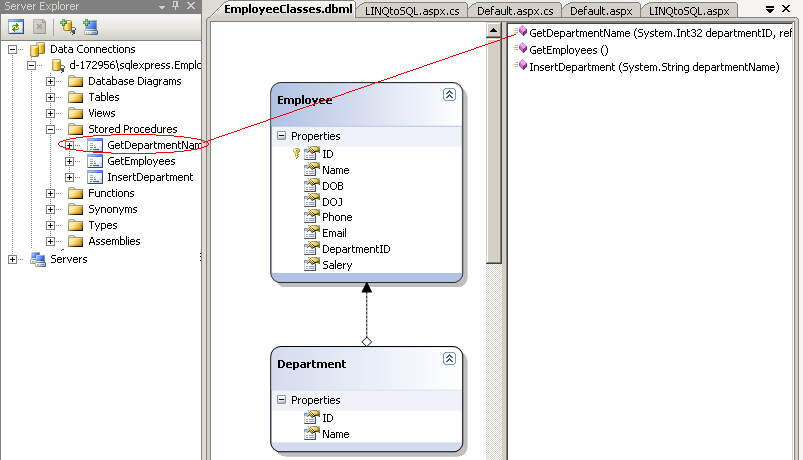
Before using LINQ-to-SQL to call the StoredProcedure we need to add the StoredProcedure to the right side panel of the DataContext (.dbml) file.

Open the server Explorer and drag the procedure to the right side panel of the .dbml file, your panel should look as follows.


Once this is done we are ready to call the StoredProcedure from the code, the code is as follows.

EmployeeClassesDataContext dbContext = new EmployeeClassesDataContext();
string strDepartmentName = string.Empty;
dbContext.GetDepartmentName(1, ref strDepartmentName);
Response.Write("Department Name: " + strDepartmentName);

That’s it, we have called a Stored procedure with an OUTPUT parameter using LINQ-to-SQL.

Thursday, May 24, 2012

LINQ to SQL - call stored procedure with parameters


LINQ to SQL - call stored procedure with parameters

Before writing a LINQ to SQL query, we first need to create a DataContext using the LINQ to SQL Classes template, to know more on how to create the DataContext refer to the post LINQ to SQL Sample


Once the DataContext is in place we can go ahead and use it to process data from the mapped database.

Assume that we have the following StoredProcedure [InsertDepartment], in the database
ALTER PROCEDURE [dbo].[InsertDepartment]
      @DepartmentName varchar(50)
AS
BEGIN
      INSERT INTO Department (Name) Values (@DepartmentName);
END

Before using LINQ-to-SQL to call the StoredProcedure we need to add the StoredProcedure to the right side panel of the DataContext (.dbml) file.

Open the server Explorer and drag the procedure to the right side panel of the .dbml file, your panel should look as follows.


Once this is done we are ready to call the StoredProcedure from the code, the code is as follows.

EmployeeClassesDataContext dbContext = new EmployeeClassesDataContext();
dbContext.InsertDepartment("IT Support");

That’s it, we have called a Stored procedure with a parameter using LINQ-to-SQL.

LINQ to SQL - call stored procedure without parameters


LINQ to SQL - call stored procedure without parameters

Before writing a LINQ to SQL query, we first need to create a DataContext using the LINQ to SQL Classes template, to know more on how to create the DataContext refer to the post LINQ to SQL Sample

Once the DataContext is in place we can go ahead and use it to process data from the mapped database.

Assume that we have the following StoredProcedure [GetEmployees], in the database

ALTER PROCEDURE [dbo].[GetEmployees]
AS
BEGIN
      SET NOCOUNT ON;

      SELECT E.ID, E.Name,E.Phone,E.Email, D.Name as Department
       From Employee E INNER JOIN DEPARTMENT D
      On E.DepartmentID = D.ID
END

Before using LINQ-to-SQL to call the StoredProcedure we need to add the StoredProcedure to the right side panel of the DataContext (.dbml) file.

Open the server Explorer and drag the procedure to the right side panel of the .dbml file, your panel should look as follows.


Once this is done we are ready to call the StoredProcedure from the code, the code is as follows.

EmployeeClassesDataContext dbContext = new EmployeeClassesDataContext();

var EmployeeDetails = dbContext.GetEmployees();
grdEmployees.DataSource = EmployeeDetails;
grdEmployees.DataBind();

That’s it, the result of the StoredProcedure will get bound to the grdEmployee GridView